 HTML Lesson #4
© D. Weinberger and
D. Thiébaut

HTML Lesson #4: Tables
-
Tables are important tools for formatting information on a Web page.
They are also simple to use.
Here is a table and its associated code:
| This is the top left cell | This is the top right cell |
| Hello from the bottom left cell! | I am in the top right cell of the table |
And how it is actually coded:
     <TABLE BORDER=3>
     <TR>
        <TD>This is the top left cell</TD>
        <TD>This is the top right cell</TD>
     </TR>
     <TR>
        <TD>Hello from the bottom left cell!</TD>
        <TD>I am in the bottom right cell of the table</TD>
     </TR>
     </TABLE>
|
You can change the color of the cells with a simple parameter in the <TD> tag, as shown here:
| This is the top left cell | This is the top right cell |
| Hello from the bottom left cell! | I am in the top right cell of the table |
And how it is actually coded:
     <TABLE BORDER=3>
     <TR>
        <TD BGCOLOR="#EE0000">This is the top left cell</TD>
        <TD BGCOLOR="#00EE00">This is the top right cell</TD>
     </TR>
     <TR>
        <TD BGCOLOR="#00EEEE">Hello from the bottom left cell!</TD>
        <TD BGCOLOR="#EE00EE">I am in the bottom right cell of the table</TD>
     </TR>
     </TABLE>
|
We have see numbers sucha as "#EE00EE" before. They are hexadecimal numbers that represents the intensities of Red, Green, and Blue (known as the RGB value) that should be used to create the color.
Remember to check www.colormix.com site for an easy way to find the RGB value for different colors.
Tables are also very nice with images, especially if one is interested in aligning text and images, as some of you have been trying to do already. In this case, the border of the table should not be visible:
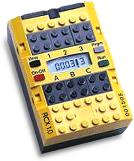 |
Here is the RCX. It contains a microcomputer and electronic circuits allowing it to control three motors and operate with three sensors. We'll see later on that we can add more motors and sensors! |

| One of the motors included in the Lego Mindstorms system. |
     <TABLE>
     <TR>
         <TD><IMG SRC="images/TheBrick.jpg" WIDTH=100 HEIGHT=100></TD>
         <TD>Here is the RCX.  It contains [...] add more motors
             and sensors!</TD>
     </TR>
     <TR>
         <TD><IMG SRC="images/motor.gif" WIDTH=100 HEIGHT=100</TD>
         <TD>One of the motors included in the Lego Mindstorms system.
     </TR>
     </TABLE>
|
You can also control the width of the table, and/or of the columns using the WIDTH parameter.
|
Here is the RCX. It contains a microcompture and electronic circuits allowing it to control three motors and operate with three sensors. We'll see later on that we can add more motors and sensors! |
|
| One of the motors included in the Lego Mindstorms system. |
     <TABLE WIDTH="400">
     <TR>
         <TD WIDTH="40%"><IMG SRC="images/TheBrick.jpg" WIDTH=100 HEIGHT=100></TD>
         <TD WIDTH="60%">Here is the RCX.  It contains [...] add more motors
             and sensors!</TD>
     </TR>
     <TR>
         <TD><IMG SRC="images/motor.gif" WIDTH=100 HEIGHT=100</TD>
         <TD>One of the motors included in the Lego Mindstorms system.
     </TR>
     </TABLE>
|
If you are interested in learning more about tables and html, check Yahoo and enter "html tutorial table" in the search box. You will find some interesting sources of information, including html.digitalsea.net, which has some nice information on tables.

© D. Weinberger and D. Thiébaut